New nvidia drivers



They havn't put them on the main download section yet, but heres a direct link to their download server.
Be warned they are over 48MB in size.
 17 Answers
 Jump to latest

thanks for the link Liono 😎 Im hoping there better than Nvidia's last drivers ❗


Thanks Liono for the pointer. But I must add, that 48Mb only refers to the American English version, ie., for those using keyboards in American configuration. For English keyboards, you must use the International version, which is over 60Mb.
Have downloaded and installed the 60Mb+ drivers, all I can say after running fs9, is fantastic. The fps has shot up to around the 60fps mark, and that's running the ATR fps gobbler. Previously was lucky to see much more than 15fps.
A completely different front end to the nVidia console, and has built in settings for the most popular games, fs9 is one of them. And I'm unable to play with it now till next Tuesday, Bah! Holidays interfere with simming.
Just wondering now, not in such a hurry for my hardware upgrade.
Thanks for the pointer to the download Liono, 'triffic!
Cheers.........

I hadn't bothered downloading them until now - last time I downloaded their new drivers, they caused problems so I rolled back my drivers to my old ones.
If these ones have improved - I'll download them right now!
So I should be downloading the 91.28_forceware_winxp2k_international.exe file then?
Thanks 😉

I've downloaded both versions of the drivers, english and international, and neither of them will load up  I've uninstalled version 84.21, rebooted the machine, but it just wont have it, I get as far as this............
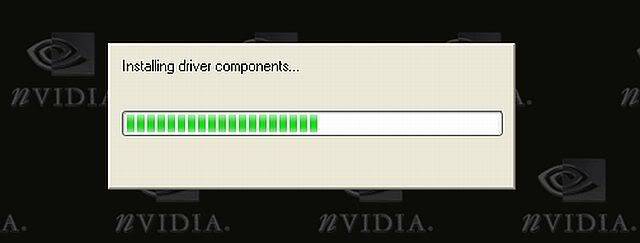
and thats it, the screen just freezes on the above, even after 30 minutes.
I've reinstalled version 84.21. 🙄
Should I be noticing any improvements with the new drivers? 

Hi Jon 😉 have you installed the new drivers ? and did they intall ok ??

Call me a brick but i never upadte Graphics Drivers.I did it once some months ago just for experiment and i didnt notice anything better and from the other side my splashscreen was flashing when FS starts.I stay to the drivers i get wih my card.
Of course this is only my point and opinion. ❗
I did install them, yes. The only message that did appear was that it said that my graphics card (Geforce 5200) hadn't been software tested by Microsoft which may cause graphical instability but I haven't noticed any major problems.
The only detrimental thing I've noticed is that on the FS9 "Create A Flight" screen, it doesn't come up with the picture of the chosen aircraft now. It hasn't provided any noticeable benefits so I might roll back my drivers later on 🙄
Greekman72 wrote:
Call me a brick but i never upadte Graphics Drivers.I did it once some months ago just for experiment and i didnt notice anything better and from the other side my splashscreen was flashing when FS starts.I stay to the drivers i get wih my card.
Of course this is only my point and opinion. ❗
I hardly ever update my drivers but I have done the past 2 times, when TTT and now Liono bought them up into the forums. I ended up rolling them back last time and probably again this time. The only reason I downloaded them is because I always hear people saying "have you made sure you have the latest drivers for your graphics card" which made me think they were important... 🤔 
I probably won't bother with them any more 😉
The experiment was done with dear TTT's link too.
Thanks for your reply Jon 😉 I must admit that, I've never noticed any difference when I've updated, I'll stick with version 84.21
It's amazing, the different results users have when installing drivers.
I must state that in the case of Graphics, there is a strict requirement/protocol
You must remove/uninstall previous driver(s), then reboot. When Windows then says it has found new hardware, just cancel that whatever, ignore it!
Yes! You will then be running in what looks like 'Safe Mode', but once installed, you can then adjust settings, very easily using the updated nVidia Control Panel.
Then before installing you must stop all Anti-Virus programs from running, after this you should get a troublefree install.
I'm using XP Home, with nVidia 6600GTX + 256Mbs graphics mem. on card, and the results for me are very good. My previous driver was version 84.21
KenTel wrote:
It's amazing, the different results users have when installing drivers.
I must state that in the case of Graphics, there is a strict requirement/protocol
You must remove/uninstall previous driver(s), then reboot. When Windows then says it has found new hardware, just cancel that whatever, ignore it!
Yes! You will then be running in what looks like 'Safe Mode', but once installed, you can then adjust settings, very easily using the updated nVidia Control Panel.
Then before installing you must stop all Anti-Virus programs from running, after this you should get a troublefree install.
I'm using XP Home, with nVidia 6600GTX + 256Mbs graphics mem. on card, and the results for me are very good. My previous driver was version 84.21
I'm with Ken here. I unistall via control panel then restart. Use Drive cleaner 3 times to get ride of any left overs. Restart then install the new drivers, restart. Then adjust my settings via the new Nvidia Control Panel.
I've done this with all the updated drivers Nvidia has released and have ran into no problems at all. Even when I update my nForce drivers I go through the same process.
Regards,
Liono
KenTel wrote:
It's amazing, the different results users have when installing drivers.
I must state that in the case of Graphics, there is a strict requirement/protocol
You must remove/uninstall previous driver(s), then reboot. When Windows then says it has found new hardware, just cancel that whatever, ignore it!
Yes! You will then be running in what looks like 'Safe Mode', but once installed, you can then adjust settings, very easily using the updated nVidia Control Panel.
Then before installing you must stop all Anti-Virus programs from running, after this you should get a troublefree install.
I'm using XP Home, with nVidia 6600GTX + 256Mbs graphics mem. on card, and the results for me are very good. My previous driver was version 84.21
I did all of the above Ken a couple of times, but to no avail
Up untill yesterday, I was running version 84.21 on Win SP1, machine always run sweet. I decided to install SP2 (again), I once installed SP2 before, but I could never sort out the conflict between SP2's firewall and the antivirus/firewall I was using at the time, even after switching one or the other off, so I re-installed SP1. I'm now using Panda antivirus/firewall, and yesterday re-installed SP2, still have to disable Windows firewall, but no probs otherwise 🙄 .
And after installing SP2 and running all the updates, version 91.28 installed straight away, no probs. I would have thought that, driver updates would install/run on either SP1/SP2 ❓ sorted anyway. 😉
Wing-man wrote:
I did all of the above Ken a couple of times, but to no avail
Up untill yesterday, I was running version 84.21 on Win SP1, machine always run sweet. I decided to install SP2 (again), I once installed SP2 before, but I could never sort out the conflict between SP2's firewall and the antivirus/firewall I was using at the time, even after switching one or the other off, so I re-installed SP1. I'm now using Panda antivirus/firewall, and yesterday re-installed SP2, still have to disable Windows firewall, but no probs otherwise 🙄 .
And after installing SP2 and running all the updates, version 91.28 installed straight away, no probs. I would have thought that, driver updates would install/run on either SP1/SP2 ❓ sorted anyway. 😉
I understand your feelings/thoughts on this matter. As I said it is amazing the diversity of results.
I'm running a dual mode set-up, XP Home and XP Pro 64, I have only installed 91.28 on XP home, so far, but will try it with the 64 bit version sometime later.
But with XP Home, I have SP2 updates, but MSs Firewall disabled, and use ZoneAlarm. Sometimes ZA gives problems, but they are quick to update I find, and invariably have an update to deal with any troubles. I use AVG7 with XP Home, and Avast with XP 64. Sad to say, I haven't found a decent compatible free firewall for XP 64, so use the MS one.
Update: Don't know yet if this fresh problem is related to the nVidia update, but I'm unable to get my Hauppauge TV Tuner to operate, the computer just locks up, with a screen full of garbage. With a reboot everything, other than the TV Tuner is back to normal again. Have removed and reinstalled the Hauppauge software and drivers, but no change, so far! There always has to be some thing to annoy. The included FM Radio Tuner operates perfectly.
 Guest
Guest
Wow, this is awesome. I appreciate nVIDIA now even more. Twice as nice!

Still does not answer your question? Ask a new question!
If the question and answers provided above do not answer your specific question - why not ask a new question of your own? Our community and flight simulator experts will provided a dedicated and unique answer to your flight sim question. And, you don't even need to register to post your question!

Search our questions and answers...
Be sure to search for your question from existing posted questions before asking a new question as your question may already exist from another user. If you're sure your question is unique and hasn't been asked before, consider asking a new question.
Related Questions
Flight Sim Questions that are closely related to this...

