



 Trainee
Hi all, I was recently informed that you need to turn ON DirectX 10 in FSX Acceleration  !
!
I have acceleration and when I go to settings > Customize > Graphics, there is no DirectX checkbox. Below is a screenshot.
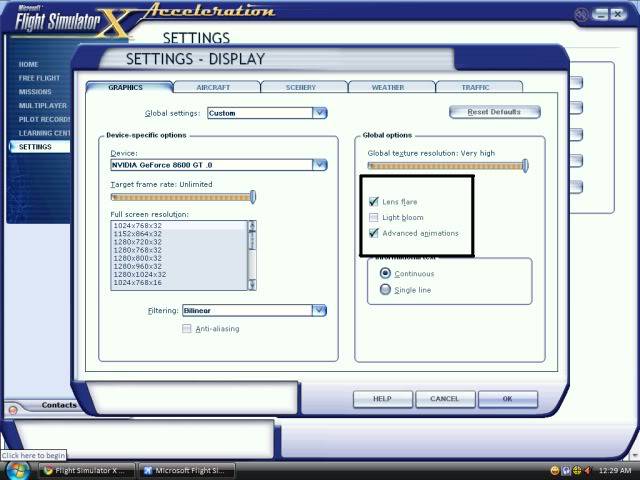
What happened here?
TraineeHi all, I was recently informed that you need to turn ON DirectX 10 in FSX Acceleration !
I have acceleration and when I go to settings > Customize > Graphics, there is no DirectX checkbox. Below is a screenshot.
What happened here?
 5 Answers

 First Officer
DX10 is entirely optional, is known to cause strange problems, and is only available in vista and windows 7. Are you running xp?
 First Officer
Traches wrote:
DX10 is entirely optional, is known to cause strange problems, and is only available in vista and windows 7. Are you running xp?
He's running Vista, this problem is strange for that i dont use it. ask RM 🙂

 Chief Captain
I see that you don't have the DX10 box.
Your better off not using it, if you do you'll have problems with other aircraft not optimized for DX10.
If you are having any jaggies you can check that AA box.
AA in the sims settings can be used in FSX not used in FS9.

TraineeInteresting. I was gonna use DX10 to film my T-45C Goshawk. TeeHee.
Dino Catenneo's Goshawk is Compatible with DX10.
 First Officer
Dude you might as well have if turned off, it can cause a hell of alot of different problems, with me it screwed up ground textures.
I think everything works and looks better without it but that's my opinion.

If the question and answers provided above do not answer your specific question - why not ask a new question of your own? Our community and flight simulator experts will provided a dedicated and unique answer to your flight sim question. And, you don't even need to register to post your question!
Flight Sim Questions that are closely related to this...
 Jump to latest

