stocz2 TraineeTrainee
Joined: May 23, 2007Posts: 94Location: Illinois
Asked

Ok, looking for some help please. As the title says, Nvidia graphic driver.
While flying ms fs2004 lately, about 10 mins. into the flight my game, and computer shuts down. Id go into (problem reports and solutions) and it keeps saying: Nvidia graphic driver has stopped working.
I would then go to update my driver, and still the same problem, and message.
I would go into my Device manager/display adapters/Nvidia geforce gtx 260/ properties. Then under the driver tab, it list: driver provider - Nvidia, Driver Date - 9/27/2009. But the one i update says it is like 2/10/2010. Would this have anything to do with my problem?
Im about to just hit the uninstall tab, and reinstall the latest driver 2/10/2010. But im not sure what happens if i do uninstall.

Would really appreciatesme help please. Plus my computer skills are not the best.

I am running it on windows vista home 64 bit,

Thank you,
stocz2

8 Answers

Latest answer ↓
stocz2 Asker TraineeTrainee
Joined: May 23, 2007Posts: 94Location: Illinois
Answered

Here is another message im getting when my screen goes off, and comes back on, Crying or Very sad

[/URL]

stocz2

RadarMan Chief CaptainChief Captain
Joined: Aug 25, 2003Posts: 17920Location: U.S.A
Answered

It sounds as if the computer needs a good dust cleaning.
Take off the side and use compressed air on the fans, the CPU fan and be sure to clean out the video card fan.
Don't ever point the can down, just straight ahead.

Radar

stocz2 Asker TraineeTrainee
Joined: May 23, 2007Posts: 94Location: Illinois
Answered

Thanks RadarMan,

But after trying to get the driver from Nvidia web site, several times nothing happened again. But then i tried my computer updates, like 3 times. It worked. I went back to check the date. And it change to todays date. So it finally took.

Took a 30 min flight, everything was ok 😀 . But then another problem arose. It froze up on me Crying or Very sad . Now, to do a search why it froze up.

Thanks again RadarMan, i will also clean it out.

stocz2

RadarMan Chief CaptainChief Captain
Joined: Aug 25, 2003Posts: 17920Location: U.S.A
Answered

Let us know if the cleaning helps, they collect quite a bit of dust and overheat.

Radar

jrocky TraineeTrainee
Joined: Dec 30, 2009Posts: 63Location: South St Paul, MN (KSGS)
Answered

stocz2 wrote:

Ok, looking for some help please. As the title says, Nvidia graphic driver.
While flying ms fs2004 lately, about 10 mins. into the flight my game, and computer shuts down. Id go into (problem reports and solutions) and it keeps saying: Nvidia graphic driver has stopped working.
I would then go to update my driver, and still the same problem, and message.
I would go into my Device manager/display adapters/Nvidia geforce gtx 260/ properties. Then under the driver tab, it list: driver provider - Nvidia, Driver Date - 9/27/2009. But the one i update says it is like 2/10/2010. Would this have anything to do with my problem?
Im about to just hit the uninstall tab, and reinstall the latest driver 2/10/2010. But im not sure what happens if i do uninstall.

Would really appreciatesme help please. Plus my computer skills are not the best.

I am running it on windows vista home 64 bit,

Thank you,
stocz2

stocz2,

There have been some issues with the Nvidia 196.75 drivers:
http://nvidia.custhelp.com/cgi-bin/nvidia.cfg/php/enduser/std_adp.php?p_faqid=2546&p_created=1268150997&p_sid=lrGIOeXj&p_accessibility=0&p_redirect=&p_srch=&p_lva=&p_sp=cF9zcmNoPSZwX3NvcnRfYnk9JnBfZ3JpZHNvcnQ9JnBfcm93X2NudD03NDIsNzQyJnBfcHJvZHM9JnBfY2F0cz0mcF9wdj0mcF9jdj0mcF9zZWFyY2hfdHlwZT1hbnN3ZXJzLnNlYXJjaF9ubCZwX3BhZ2U9MQ!!&p_li=&p_topview=1

jrocky

stocz2 Asker TraineeTrainee
Joined: May 23, 2007Posts: 94Location: Illinois
Answered

Well this morning i got onto my computer, and not even 5 mins. my screen went off and came back on. It happen a few times. Then i seen this post by jrocky

There have been some issues with the Nvidia 196.75 drivers:
http://nvidia.custhelp.com/cgi-bin/nvidia.cfg/php/enduser/std_adp.php?p_faqid=2546&p_created=1268150997&p_sid=lrGIOeXj&p_accessibility=0&p_redirect=&p_srch=&p_lva=&p_sp=cF9zcmNoPSZwX3NvcnRfYnk9JnBfZ3JpZHNvcnQ9JnBfcm93X2NudD03NDIsNzQyJnBfcHJvZHM9JnBfY2F0cz0mcF9wdj0mcF9jdj0mcF9zZWFyY2hfdHlwZT1hbnN3ZXJzLnNlYXJjaF9ubCZwX3BhZ2U9MQ!!&p_li=&p_topview=1

I then downloaded it, now i am waiting to see if this has done anything to improve things.
I didn't have time to go out and buy some compressed air yet. So i haven't tried cleaning my system yet, RadarMan. But i intend to do this also.

Im gonna go take a 30min flight now, to see how things work out in fs2004.

Thanks jrocky for the link,

stocz2

stocz2 Asker TraineeTrainee
Joined: May 23, 2007Posts: 94Location: Illinois
Answered

Ok, just did 2 flights back to back. Total of just over 3 hrs., and had no problems 😀 😀 . Thank you RadarMan, and jrocky for your help.

stocz2

stocz2 Asker TraineeTrainee
Joined: May 23, 2007Posts: 94Location: Illinois
Answered

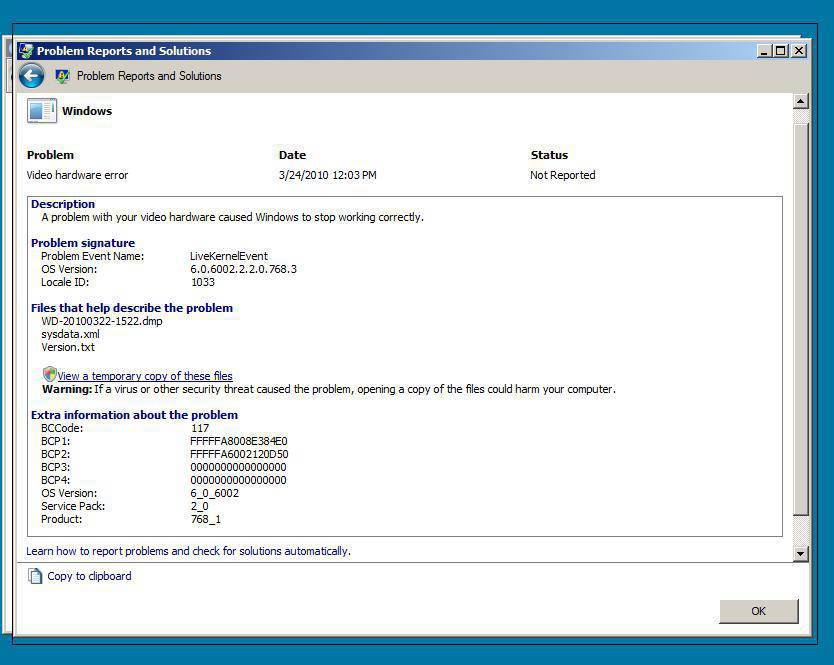
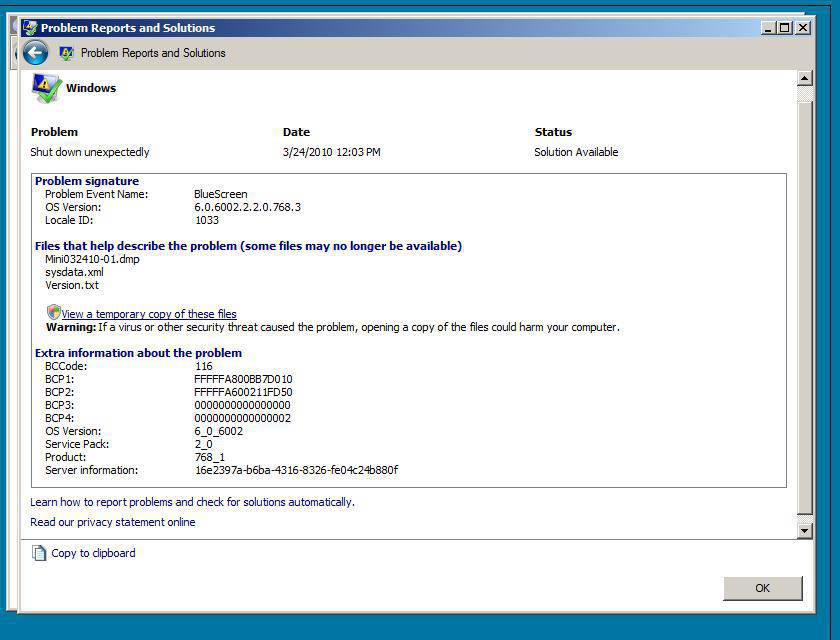
Looking for some more help please. After my last post 3/19/10 every thing was fine. I didn't try flying until Tuesday 3/23/10. Then the problem came back. In FS2004, and FSX.
Here are the problem reports im getting:

[/URL] and

[/URL]

I did dl the newer driver that jrocky showed me. I also removed my video card, blew it out. Blew out my mobo, and everything else in my case, like RadarMan suggested. I also removed my cpu fan, cleaed off the thermal compound, and added a new layer.
I have 3 large fans, plus 2 smaller fans blowing into my case.
I have no idea about what these problem reports are. Or how or where to check to see how to fix problem.
I have been flying FS2004 for some time on this computer with no problems before. I don't rmember if erything started after vista sp2 was installed or not.
This does not happen when im playing Trainz2010, or AA3.

Help would be really appreciatted.
Thanks, stocz2

Know a better answer?

Add what worked for you. Every answer helps the next simmer who searches for this.

Ask Fly Away · AI assistant

Still stuck on this question?

Ask Fly Away, our AI flight sim & aviation assistant, for an instant answer to this exact question — or ask the community below.