How to set FSX up to use Dual Monitors
 kdw6977
Guest
kdw6977
Guest
How do you set up Flight Sim X to use dual monitors?
Thank you for your time.
 32 Answers
 Jump to latest


kdw6977 wrote:
How do you set up Flight Sim X to use dual monitors?
Try some of these links:
kdw6977
Guest
Thank You...
That is how I have my system set up already... I was hoping for some advice on how to get like a Left "windscreen" on the left monitor and a right "windscreen" on the right monitor.
Is this possible?
Thanks...
kdw6977
Guest
Bump...
Similar to this...
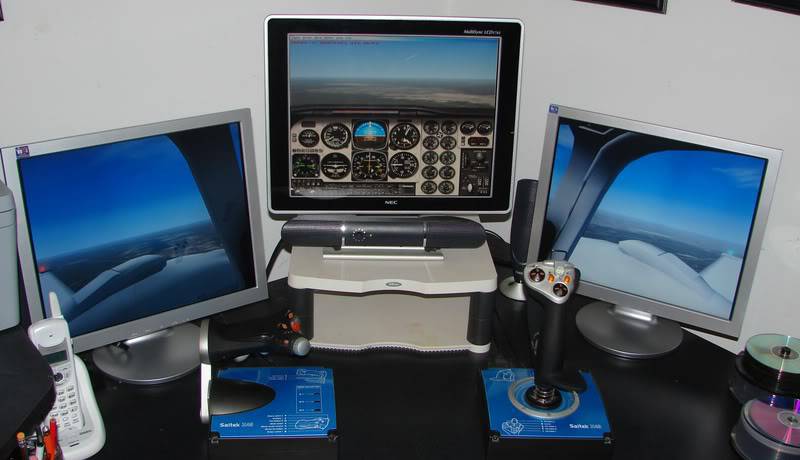
Still looking. Each monitor requires a different graphics card or a graphics card with dual outputs. Your views will be limited to the views that are within the program(2D). How do you assign a view to the extra monitor? Not sure, I only have one monitor. I would assume that it's a standard way, having to do with Windows more than anything special in FSX. 🙂


Ok, I look forward to what you can find!
Thank you...
Sorry, I forgot to mention that I signed up for membership since I posted the first post in this thread.
TheKaiser wrote:
Sorry, I forgot to mention that I signed up for membership since I posted the first post in this thread.
Welcome to Flyaway, 🍻 it's always good to have a new member.
I'll see what I can find. Hopefully another person that has dual monitors will step in to help. 🙂


donno whether this is what you are looking for..try this ..
I took a look at the Wideview, I will give it a shot to see what happens...
Thank you!
Does anybody have experience with Wideview?
I installed the demo last night and could not get it to work. It appears that Wideview is intended for multiple PC's networked together. Their site says that it will work on a 1 PC, 1 Graphics Card, 2 monitor set up, but I have not been able to configure the software to work properly.
Does anybody have some input?
Thank you!
May be you can try mailing the author or some of the people who have implemented it and made home made cockpits...I guess these people have put up their contact mail on the site...hope this helps..
Ok, The Wideview Software is for more than 1 PC according to their Tech Support.
Does anybody have another possible solution to using two monitors with 1 PC for FSX?
Thank you all for your responses and time!

Have you figured it out? Does you card support more than one monitor? If you have more than one VGA output or one VGA and one DV-I output, you should be able to do it. I've been gone for a couple of days so I am just seeing the post. Let me knoe if you have already figured it out.
I figured it out after reading through on the "undocking" method. Thank you!
The only thing is, is that I have a kick-butt machine, tons of ram on the machine and on the video card, plus a dual core 3 something Ghz processor, but if I have the graphics up past the bare minimum, it shakes and stutters if I have multiple windows open.
Do you have any tips?
Thank You again!
Have you used that tweaking guide that's been floating around on the forums? My processor is not as fast as yours and mine runs fine. I am not on minimums but I'm not maxed out either. That guide made a difference.
Let me be honest, I don't mess around in NYC without lowering the graphics, but around Atlanta, Tampa, Daytona, Detroit I have been fine.
I have not seen the tweaking guide, could you tell me where to find this guide!?
Thank you!
i tried with the dual monitor on mylaptop...Although i can use windows inbuilt dual monitor setup and could work with multiple windows .But when i started FS and tried to drop in the Overhead panel on the second monitor it didn't go...
SchWing
Guest
I had that problem too, what I did is to use window mode while your in flight, then select new view, let's say cockpit view, then right clic on that view and undock it. After you should be able to drag it on your second monitor.
Enjoy!

I will also have to try this!
zorro3692
Guest
😕
I figured it out after reading through on the "undocking" method. Thank you!
Can you please explaing the "undocking method" in detail. Apprectiate it.


I have a EVGA 8800 GTX with dual monitors. It was great for short flights but I finshed a long 6 hour flight, my computer crashed. Tried it a few more times with FSX and the same thing. i read somewhere that both monitors have to have the same size setting. I tried that yesterday and so far so good. I'll do more testing this weekend to make sure.

CRJ CHIEF CAPT
Where can I get the USAIR skin for the CRJ. ❓
Thanks
I have the dual monitors and when I undocked a few windows, including the GPS I was able to move them over to the second monitor. One thing on monitor size so it won't crash. Make sure both are set to their default, usually the largets, monitor size setting. Even though they are both different maximum sizes, when I did that, the crashing problem stopped.
Hope this helps.

i have awful machine but high graphic works for me 

Guest
It's truly amazing how many useless posts and comments there are on mutli-monitor use on the internet. Everyone only explains the straightforward connecting of the monitors, which of course already speaks for itself, but noone even touches the subject of how to use it!
Is there anyone who can explain how to USE the multi-monitor setup to expand the real view? Of course every kid can drag an undocked window to a second monitor, but how do you extend one window over both monitors?
I'm constantly getting annoyed by missing the right side of my view, because the monitor is filled with crap, only to not waste the use of the second monitor I bought, but how do I get the rightside view of my ockpit without seeing two seperate runways stretching out in front of me in a big V-shape and am looking at two sides of the cockpit that dont connect or wont work together?

In XP you used to be able to do a single continuous desktop stretched across both monitors, which would allow FSX to stretch across both as well. Now with vista and 7 that doesn't work any more, so to get the same effect you either need to use triplehead2go or an ATI eyefinity setup.
And again, STOP NECROING OLD THREADS PLEASE.
guest
Guest
Traches:
Please learn how search engines work. People search for "dual monitor flight simulator x" and this is what they get. then when they see your rude comment of "stop necoring old treads" they think you don't quite get how the Internet works.
Guest
Press [ to open a new view window. You can drag this window to your other screen and set the view to whatever you like (see the keyboard control guide to set your view to precisely the view you want). I know this is old, but it pops up in searches and so far nobody has posted the answer.


Hello!
Setting up Microsoft Flight Simulator X (FSX) to utilize dual monitors can significantly enhance your flight sim experience by expanding your field of view or dedicating one monitor to displaying crucial instruments. Here's a step-by-step guide on how to accomplish this:
Step 1: Configure Windows display settings
Before configuring FSX, you'll need to ensure that your Windows display settings recognize both monitors. You can do this by:
- Right-clicking on your desktop and selecting Display settings.
- Scroll down and click on Detect to make sure both monitors are identified.
- Under Multiple displays, select Extend these displays from the dropdown menu.
Step 2: Modify FSX settings
Now that your monitors are set up properly in Windows, you can proceed with the FSX configuration:
- Launch FSX and navigate to the Settings tab.
- Click on the Customize button in the Display section.
- In the Global options section, select the Widescreen 16:9 aspect ratio.
- Adjust the screen resolution to match the combined width of both monitors and the height of the tallest one (e.g., 3840x1080 for two 1920x1080 monitors).
- Apply the changes and exit the settings.
Step 3: Use windowed mode
Running FSX in windowed mode will allow you to stretch the simulator across both monitors seamlessly:
- In FSX, press Alt+Enter to switch to windowed mode.
- Drag the edges of the FSX window to cover both monitors entirely.
Now your FSX setup should be displaying across both monitors, providing an enhanced visual experience.
As for the newer Microsoft Flight Simulator (MSFS) 2020, a similar approach can be applied. The main difference is that MSFS 2020 has native support for multiple monitors, so you won't need to use windowed mode. Simply configure the monitors in Windows, and then adjust the resolution and display settings within MSFS 2020 to match your dual-monitor setup.
I hope this guide helps you enjoy an improved flight simulation experience with dual monitors. If you have any further questions, feel free to ask!
Happy flying!

Still does not answer your question? Ask a new question!
If the question and answers provided above do not answer your specific question - why not ask a new question of your own? Our community and flight simulator experts will provided a dedicated and unique answer to your flight sim question. And, you don't even need to register to post your question!

Search our questions and answers...
Be sure to search for your question from existing posted questions before asking a new question as your question may already exist from another user. If you're sure your question is unique and hasn't been asked before, consider asking a new question.
Related Questions
Flight Sim Questions that are closely related to this...

