Fly Away Simulation - Free Resources for FSX, FS2004 & X-Plane
Your #1 Source for Flight Simulators!
 RegisterRegister now!   SearchSearch   LoginLogin 

A321 Joystick Error

Post new topic   Reply to topic
Author Message
ehuang6
Trainee
Trainee


Joined: Jan 20, 2007
Posts: 25
Posted: Tue Sep 16, 2008 2:17 am 

How come the A321 is so hard to control above 200ft. When it's below that altitude, the aircraft operates exactly like a Boeing, but above the altitude, I have to wait like 5 seconds before it responds to my command on the joystick.

Please let me know how to fix this problem.

Hit with Chair
Back to top
View users profile
Tailhook
Chief Captain
Chief Captain


Joined: Oct 12, 2005
Posts: 8480
Location: El Dorado
Posted: Tue Sep 16, 2008 3:02 am 

...pilot error -- or, my guess is you saved a flight, made it your default flight and now the settings from that saved flight control your 321. Try deleting your saved flights and see if the problem persists.
Back to top
View users profile
Razgr1z912
Captain
Captain


Joined: Dec 30, 2006
Posts: 863
Posted: Tue Sep 16, 2008 5:09 am 

No..No..

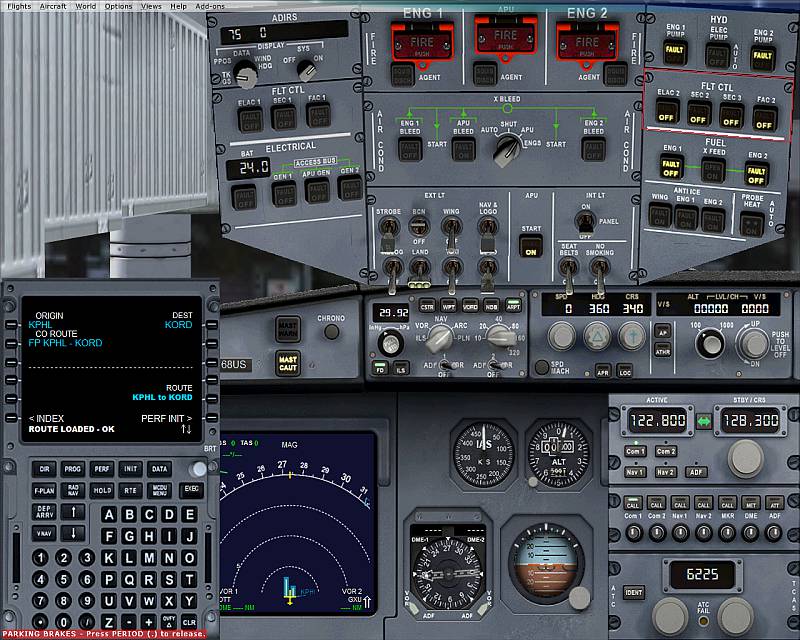
On overhead panel top right corner, second row down. Its the fly-by-wire controls, turn off all four, or go into the A231's aircraft.cfg and find
Code:
wire


It should say something about Fly By Wire, if it is 1, make it 0, or vise versa.
Back to top
View users profile
Tailhook
Chief Captain
Chief Captain


Joined: Oct 12, 2005
Posts: 8480
Location: El Dorado
Posted: Tue Sep 16, 2008 5:58 am 

Raz those four switches are OFF by default. I doubt that he messed with those without knowing what they're for. Same goes for the "fly_by_wire = 1" in the aircraft.cfg.
If ehuang6 is new to this business he'll have a hard time finding the .cfg in the first place let alone edit it.
Back to top
View users profile
Razgr1z912
Captain
Captain


Joined: Dec 30, 2006
Posts: 863
Posted: Tue Sep 16, 2008 2:35 pm 

Oh yes, they're suppsoted to be on. Its FTL CTRL I believe. Let me get a pic
Back to top
View users profile
Razgr1z912
Captain
Captain


Joined: Dec 30, 2006
Posts: 863
Posted: Tue Sep 16, 2008 2:58 pm 

Back to top
View users profile
n7xlq1
First Officer
First Officer


Joined: Mar 25, 2007
Posts: 379
Location: KLUF and KGEU
Posted: Wed Sep 17, 2008 4:03 am 

Hey Raz, I have two questions for you?

1) What does those switches do or don't do?

2) How did you get that FMC, that's not part of the 321 in FSX is it?
Back to top
View users profile
Post new topic   Reply to topic All times are GMT

Page 1 of 1
You can post new topics in this forum
You can reply to topics in this forum
You cannot edit your posts in this forum
You cannot delete your posts in this forum
You cannot vote in polls in this forum

Related Topics

Search

Search for aircraft, downloads, news and even the discussion forums all from here.

Unlimited Downloads

Unlimited access to thousands of FSX, FS2004 & X-Plane flight simulator downloads including aircraft, scenery and expansions for only $5 per month. Along with many other benefits and features.

Register now

Survey

Have you downloaded your copy of Microsoft Flight?

Yes, I really enjoy playing it!
No, I haven't downloaded it yet...
I'm going to stick with FSX
I haven't even moved to FSX, I'm sticking with FS2004
No, X-Plane all the way!
...Microsoft what?

Votes 84

Social

 
RSS Feed iPhone App
Customer Support