Asked

Hello,

I have downloaded Easyjet, BMIbaby and other airlines onto my FSX, as AI aircraft, the question I want to ask is that ATC does not use 'Easy' as the callsign or 'Thomson' for Thomsonfly aircraft but uses the flight number, yet for BMIbaby ATC does use the callsign 'Baby'?

What can I do (and where can I change this) to change this.

Thanks for your help.

Answers 64 Answers

Answered

I have this problem also, the link I was given was edit voice pack but I have no idea how to use it 😉

Answered

No probs, thanks though.

Answered

D5Tweddle wrote:

No probs, thanks though.

No need to thank, I didn't do anything 😂

Answered

i am not sure it will work but i have done this is and it worked go to aircraft.cfg and go to the texture.x as in the texture u want and there should be something like this atc_airline= and the name. so go there and write the name u want. If it is blank that means it just uses the atc_id which is call number. First try it on your aircraft then on ai traffic. If it doesn't put back what was written before.

hope this helps

Answered

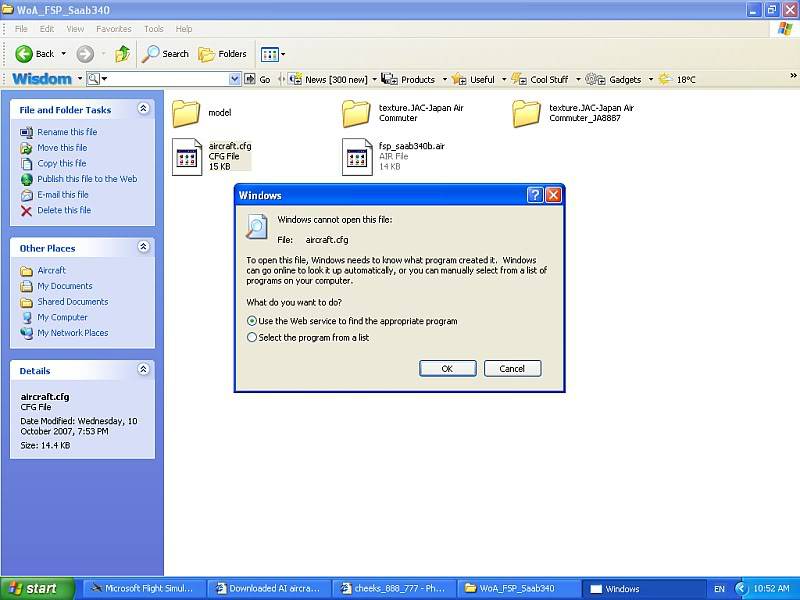
How do you go into the cfg folder, this is what comes up

Answered

Select the program from the list, use notepad.

Radar

Answered

Finally, THANK YOU SOOOO MUCH 😀

Answered

Thanks for that.

I have done this to no joy. All of the Easyjet aircraft have EASY where it says ATC airline etc. I have changed this to Easy (lowercase) but to no affect. ATC still says the flight number and not 'Easy'. So I am still baffled why it will use Baby for BMIBaby but not Easy for Easyjet.

Answered

D5Tweddle wrote:

Thanks for that.

I have done this to no joy. All of the Easyjet aircraft have EASY where it says ATC airline etc. I have changed this to Easy (lowercase) but to no affect. ATC still says the flight number and not 'Easy'. So I am still baffled why it will use Baby for BMIBaby but not Easy for Easyjet.

The same happened with me. I suggest trying to find any Easyjet plane with the proper callsign, go into that planes cfg, copy and paste atc_airlines=**** but just paste the **** into the AI easyjet atc_airline=. It should work because AI recognizes the text. it worked for me 😉

Answered

Hello, have not replied for a while!

Still no joy with Easyjet or Ryanair. I have downloaded quite alot of AI Traffic, the call signs that ATC recognise so far are:

Iberia
Speedbird
Shamrock
Lufthansa
Swiss
Monarch
Air France

Airlines that, for the life of me I can't get working unless someone knows how to get them working, are:

Easyjet
Ryanair
Thomsonfly
Air Berlin
Aer Arran
Thomas Cook
TUI Hapag Llyod (call sign 'Yellow Bus')
KLM
Alitalia

Look forward to advice on how to get these call signs going!

Answered

Having spent the last 2 hours going through most callsigns here is what FSX ATC recognises, apart from my last post:

RYAN for Ryanair
BRITANNIA for Thomsonfly
ALITALIA
KLM
EUROPA for Air Europa

I have tried everyway possible for easyjet, and no joy at all. It is the same for Air Berlin, it just will not state 'Berlin' 'Air Berlin' 'AIRBERLIN', so I am stuck there as well. All in all I have tried over 50 airlines callsigns with diffrent variations including upper and lower case, 2 seperate words, one word etc etc.

Look forward to any views/advice.

Answered

Can't believe this, it won't expect: Europe, European, Charter, Berlin, Ireland, VLM, but will accept Orange??

Answered

it might have to do with the Ai's name on the texture thing

Answered

What do you mean?

Answered

never mind I was thinking of something else sorry

so changing the call sign didn't work?

Oh and where do u get your ai aircraft

Answered

I also have a sort of same problam,

I downloaded the Easyjet and others aswell from World of AI

And the Easyjet dont use the callsing EAZY*** it just uses something like NY3922

Answered

I thought Easy jets call sign was 'Easy'?

Oh well.

I downloaded my AI traffic from 'World of AI Packages', an excellent site.

Still no further joy with call signs, looking for a miracle now!

Answered

No i fink there real callsing is EZY***

Like:

EZY001 contact tower on 118.90

Answered

Cheers for that. Lets hope anyone else can help with getting these callsigns recognised.

Answered

Hear are some more callsigns that FSX recognises:

Virgin
Transavia
LTU
Midland
Southwest
Regional
SABENA
Jersey

I have noticed that it recognises legacy airlines, or airlines that have been around a while. I think it only accepted Ryan (for Ryan Air) because of a Ryan International in the US?

I am just surprised that it does not recognise the following:

Berlin, Express, Channel, City, Hopper, Flyer, Business, Jet, Air, Euro, Europe, Sky, Service, British etc

Any views

Answered

Can i ask where you got all these AI planes ❓ I can't find them on the downloads...

Answered

A BREAKTHROUGH!! What you have to do is get edit voice pack. Download it then extract it. Then go to the aircraft cfg and where it says atc_airline= write anything you want. Then go to edit voice pack and click update. Then when you go to FS and atc says ANYTHING. It will even say kwak or something. That was how I got it to work 😉

Answered

Zeemon wrote:

Can i ask where you got all these AI planes ❓ I can't find them on the downloads...

Of course you can. Go here: http://www.world-of-ai.com/ and take your time reading through the page. This is the easiest AI traffic to install 😀

Answered

Cheeks wrote:

A BREAKTHROUGH!! What you have to do is get edit voice pack. Download it then extract it. Then go to the aircraft cfg and where it says atc_airline= write anything you want. Then go to edit voice pack and click update. Then when you go to FS and atc says ANYTHING. It will even say kwak or something. That was how I got it to work 😉

OMG Thankyou Cheeks WELL DONE MATE 👍 You have now made my day thanks.

Answered

That was how I felt....I'm glad I could help 😉 🍻

Answered

Cheeks wrote:

A BREAKTHROUGH!! What you have to do is get edit voice pack. Download it.

Where can i download it from ?

Answered

Direct link- ➡ http://www.editvoicepack.com/
Use 3.1 😉 😀

Answered

Cheeks wrote:

Direct link- ➡ http://www.editvoicepack.com/
Use 3.1 😉 😀

Thanks 😀 😀 😀

Answered

Hope everything works out as well as it did with me 😉

Answered

Tailhook wrote:

Zeemon wrote:

Can i ask where you got all these AI planes ❓ I can't find them on the downloads...

Of course you can. Go here: http://www.world-of-ai.com/ and take your time reading through the page. This is the easiest AI traffic to install 😀

Thank you much 🙂

Answered

Thank you soooo much!!

Answered

Damn, can't get it to work on FSX, and I don't use fs2004, any suggestions, or am I doing something wrong?

Answered

D5Tweddle wrote:

Damn, can't get it to work on FSX, and I don't use fs2004, any suggestions, or am I doing something wrong?

I will try in a bit aswell so i'll see what happends here

Answered

Thanks, getting a bit frustrated now.

Answered

I just tried it by just installing Air France, been flying around at EHAM, and there was 1 air france, so here it just works...

Answered

D5Tweddle wrote:

Damn, can't get it to work on FSX, and I don't use fs2004, any suggestions, or am I doing something wrong?

Sounds to me as though you haven't read the page - don't take me wrong, but I haven't heard of compatibility issues as they HAVE updated their packages for FSX. Are you using their installer?

Answered

Tailhook wrote:

D5Tweddle wrote:

Damn, can't get it to work on FSX, and I don't use fs2004, any suggestions, or am I doing something wrong?

Sounds to me as though you haven't read the page - don't take me wrong, but I haven't heard of compatibility issues as they HAVE updated their packages for FSX. Are you using their installer?

I didnt read it... but i got it to work 😛 only thing is really that on the installer you have to pick FSX on the dropdown box

Answered

Zeemon wrote:

I just tried it by just installing Air France, been flying around at EHAM, and there was 1 air france, so here it just works...

EHAM is not exactly a grass strip - push your slider in Settings for AI Traffic a bit higher --- or take off from Charles De Gaulle and you should see a difference.

Answered

Tailhook wrote:

Zeemon wrote:

I just tried it by just installing Air France, been flying around at EHAM, and there was 1 air france, so here it just works...

EHAM is not exactly a grass strip - push your slider in Settings for AI Traffic a bit higher --- or take off from Charles De Gaulle and you should see a difference.

well yea, but i was just showing it works 😛 my slider is at 100% though, unless the installer changes it + it also depends what time of the day your there i suppose 😛

Now im just installing all the other aviations 😛

Answered

I am obviously doing something wrong! Where do I find there installer? I followed the link for edit pack and then extracted it. I feel like an idiot now! Can someone tell me how to download for FSX??

Answered

By the way, I am talking about editvoice pack NOT ai aircraft (I have all of them downloaded) for FSX

Answered

D5Tweddle wrote:

By the way, I am talking about editvoice pack NOT ai aircraft (I have all of them downloaded) for FSX

ah...

Answered

anybody able to help with editvoice pack for FSX? cheers

Answered

D5Tweddle wrote:

anybody able to help with editvoice pack for FSX? cheers

Is that to change the ATC voice? if it is then i will later on 😛

Answered

D5Tweddle wrote:

By the way, I am talking about editvoice pack NOT ai aircraft (I have all of them downloaded) for FSX

What's wrong with you guys.... steroids for breakfast or still in the chatroom??? 😳

Just read the thread - here it is again: http://www.editvoicepack.com/

😛

Answered

Users of Microsoft Flight Simulator 2004: A Century of Flight should use the following version:
Download: EditVoicepack 3.1 (1.8MB)

I have FSX? I tried downloading the FSX version and it failed miserably, I am just asking for a little bit of help.

Answered

D5Tweddle wrote:

I have FSX? I tried downloading the FSX version and it failed miserably, I am just asking for a little bit of help.

Well, makes me wonder where you found the FSX version:

Downloading EditVoicepack

A Flight Simulator X compatible version is currently being developed, and a community technology preview is available for download. Please visit the development wiki page for details.

I'm not using it myself, just trying to help you read Doh!

😀

Answered

Panic over, installed this time for FSX. I can confirm that my WTA 747 used the callsign 'Easy'!!

I now have the challenge of updating all of the AI aircraft callsigns.

Thanks again

Answered

use http://www.fsonline.dk/en/index.php?title=EditVoicepack link for the FSX version.

I had to make sure I have Microsoft framework 3.0 for it to work (hence why it failed first time round!)

Answered

D5Tweddle wrote:

Panic over...

Praised be the gods!!

I now have the challenge of updating all of the AI aircraft callsigns.

Don't rush into things now, okay..? Fear

😀

Answered

Easy tiger.....

It has updsated the call signs anyway.

Answered

There is no version for FSX yet guys. Come on now.

Answered

I hope you are joking?? serious conversation and all. I know some people like to be sarcastic (as above) and I have downloaded it for FSX.

Answered

Does it really matter? As long as it is working 🙄 I'm glad my explanation could help everyone 😀

Answered

Your help was greatly appreciated.

Answered

D5Tweddle wrote:

Panic over, installed this time for FSX. I can confirm that my WTA 747 used the callsign 'Easy'!!

I now have the challenge of updating all of the AI aircraft callsigns.

Thanks again

Hmmm, i just can't get the easyjet to work...
Is it:
atc_airline=EASY
in the aircraft.cfg?

Thanks in advance,
Zeemon

Answered

Did you press update in Edit Voice pack? 😉

Answered

Cheeks wrote:

Did you press update in Edit Voice pack? 😉

Did now 🙂 Gave it a short try before i went to work this morning, I just picked a airbus a321, flew it but the atc just called me airbus instead of easy. Might be that it only works for AI (or doesn't work because the actuall airline was one of the defaults.

But I'm quite sure the voice pack installed, because they now say freqs like:
120 decimal 5
instead of
120 point 5
😛

But I'll just give it another go this evening and see if they do give the AI the proper Callsigns.

Answered

Once you have updated in the editvoice pack, it should use 'Easy' as the call sign (as long as you have put:

atc_airline=EASY
in the aircraft.cfg

I have also noticed it uses expresions like 'bye bye', g'bye, and when you take off it gives you the wind speed and direction.

Good luck though.

Answered

D5Tweddle wrote:

Once you have updated in the editvoice pack, it should use 'Easy' as the call sign (as long as you have put:

atc_airline=EASY
in the aircraft.cfg

I have also noticed it uses expresions like 'bye bye', g'bye, and when you take off it gives you the wind speed and direction.

Good luck though.

Yup, got it to work 🙂 I have heard: Easy, Air Berlin, Ryanair, Arkefly, etc. To be short i heard no more planes without a proper callsign 😀

And indeed they changed more 😎 Another cool thing is that they say instead of "go around" -> "Go around, I say again, Go around, acknowledge"

Good stuff people 😀 good stuff

Answered

Zeemon wrote:

D5Tweddle wrote:

Once you have updated in the editvoice pack, it should use 'Easy' as the call sign (as long as you have put:

atc_airline=EASY
in the aircraft.cfg

I have also noticed it uses expresions like 'bye bye', g'bye, and when you take off it gives you the wind speed and direction.

Good luck though.

Yup, got it to work 🙂 I have heard: Easy, Air Berlin, Ryanair, Arkefly, etc. To be short i heard no more planes without a proper callsign 😀

And indeed they changed more 😎 Another cool thing is that they say instead of "go around" -> "Go around, I say again, Go around, acknowledge"

Good stuff people 😀 good stuff

Yeah, the updated ATC is really cool. Im glad I could help everyone out 😀

Answered

Thanks for your help, makes a diffrence when you make a flight, bit more realistic.

Answered

D5Tweddle wrote:

Thanks for your help, makes a diffrence when you make a flight, bit more realistic.

No problem 😉 Hope flights are more enjoyable now 😀 They are for me ❗

Still does not answer your question? Ask a new question!

If the question and answers provided above do not answer your specific question - why not ask a new question of your own? Our community and flight simulator experts will provided a dedicated and unique answer to your flight sim question. And, you don't even need to register to post your question!

Ask New Question...