Asked

Recently during Multiplayer sessions, the aircraft textures go blurrie from a far distance and I have to zoom in to correct them.

Its really annoying and never usually happens, yet it effects all my aircraft from the default 737 to my payware cessnas!

Does anyone know how I can advoid it, in the display settings my aircraft level of detail is set to the max with all the options ticked and I have an nVidia GeForce FX 5600 video card that has 256mb memory!

Thanks

Answered

It's the amount of ram (memory) that helps texture rendering, the more you have the quicker the scenery and textures "come on" instead of waiting for them to click on while your watching.

Radar

Answered

Well I have 256mb ram on my video card and 768mb ram on my motherboard, and it hasnt been a problem before! 😕

Answered

The LOD (level of detail) on some aircraft can stop your computer. I don't have a power-house and a few have given me a slide show.
You may be using much of that ram on programs running in the background.

Have you tried this program yet.

https://flyawaysimulation.com/downloads/files/2948/fsautostart-v11/

Radar

Answered

Thanks for the link 😀

Answered

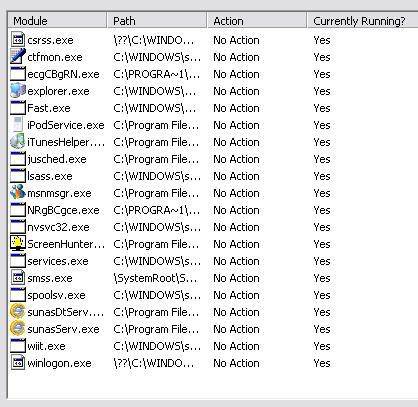
I'm just about to start a flightsim session and I'm wondering what programs to disable:

I also have hunderds of 'Services' running and dont know what most of them are, so should I which ones should I disable???

Thanks

Answered

If you hover your cursor over the action you will get a recomendation start with that.

Answered

Personally i would close quit alot of those background files whilst running flight sim. I Would definitely close msn messenger, screenhunter, itunes, ipodservice and internet explorer. Basically i would close everything that appears when i run task manager to make sure everything is going to my FS. Afterall i am trying to use the flightsimulator, not arrange files on my Ipod.

Still does not answer your question? Ask a new question!

If the question and answers provided above do not answer your specific question - why not ask a new question of your own? Our community and flight simulator experts will provided a dedicated and unique answer to your flight sim question. And, you don't even need to register to post your question!

Ask New Question...